Two Factor Authentication is now available on BeyondUnreal Forums. To configure it, visit your Profile and look for the "Two Step Verification" option on the left side. We can send codes via email (may be slower) or you can set up any TOTP Authenticator app on your phone (Authy, Google Authenticator, etc) to deliver codes. It is highly recommended that you configure this to keep your account safe.
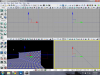
I'm having trouble making the square light up red so I can drag it diagonally to line up with the wall. Check image to see what I'm trying to accomplish. When I click it nothing happens???
It looks like you posted this in the wrong forum, Wormbo moved it.
You can't really move things diagonally because you have the "snap to grid" enabled (which is a good thing). So you can only move the widget either left/right or up/down.
So you need to move it up/down then left/right in order to get it to the place you need.
Move brush in to different place - rebulid geometry - try once again...
Ps: that hapen because when you have already existing face in the level, then editor try to snap brush to them. Tip: decrese your grid - i work with drag grid = 1
This site uses cookies to help personalise content, tailor your experience and to keep you logged in if you register.
By continuing to use this site, you are consenting to our use of cookies.