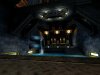
This was created at a 1600x1200 resolution.
Hi. The purpose of this thread is to be able to make UT look and sound as best as it can. I will post my settings and people can tell me what to do in order to make it better.
UPDATE #24 - April 18, 2006
These settings are in UnrealTournament.ini in UnrealTournament\System. These setting can also be modified in game by opening up the console (press ~) and typing in "preferences" (without the quotation marks). This opens up the Advanced Preferences window. Using the Advanced Preferences window is probably the easiest.
WARNING these settings are not for the elderly computers. (Ancient Systems/Graphics Cards/Sound Cards) Everything is set to the highest quality settings possible. Please don't come complaining to me that your 1 mhz system doesn't run it.
Please remove the // and the explanations behind them if you copy and paste the settings, because if you don't your computer will explode. Seriously though, it would be best to remove the explanations even though UT might still work.
And in case you were wondering, click the underlined stuff to download it. Example: -> <-
And of course, always backup the files when you change them. Just in case...
One last thing, this thread is designed for windows users. I sincerely apologize if it is unfriendly toward your operating system.
------------------------------------------------------------------------------------------------------------------------------------
Patches (Make sure you have one of these installed first before you install anything else below.)
v436 Mirror #2 Mirror #3 More Mirrors (Last official patch.)
v451b Mirror #2 Mirror #3 More Mirrors(Not official and it messes up UnrealEd. I find it quite buggy. You should probably stick to v436 unless you run a server.)
------------------------------------------------------------------------------------------------------------------------------------
[Engine.GameEngine]
CacheSizeMegs=64 // This is the amount of memory the game sets aside for things it caches. I've heard two different schools of thought on this:
School 1: Assume that for every 4 Megs of cache, that you have 128 Megs of memory. So a machine with 256 Megs would set this to 8, 512Megs would set it to 16, 1 Gig (1024 Megs) would set this to 32 and 1.5 Gigs would set this to 48. Anything over 64 is overkill.
School 2: Set this to 3/4 the total amount of RAM your machine has. If you have 128 Megs of RAM, set this to 96. 256 Megs, set this to 192. 512 Megs, set this to 384. 1 Gig, set this to 768. Higher than 384 might already be overkill, and UT will never need that much RAM (The game itself is only 550 Megs or so).
------------------------------------------------------------------------------------------------------------------------------------
[WinDrv.WindowsClient]
WindowedViewportX=640 // Windowed Resolution (Horizontal)
WindowedViewportY=480 // Windowed Resolution (Vertical)
WindowedColorBits=32 // Windowed Color Depth (16 or 32)
FullscreenViewportX=1024 // Fullscreen Resolution (Horizontal)
FullscreenViewportY=768 // Fullscreen Resolution (Vertical)
FullscreenColorBits=32 // Fullscreen Color Depth (16 or 32)
Brightness=0.500000
MipFactor=1.000000
UseDirectDraw=True
UseJoystick=False
CaptureMouse=True
StartupFullscreen=True
CurvedSurfaces=True
LowDetailTextures=False
ScreenFlashes=True
NoLighting=False
SlowVideoBuffering=True
DeadZoneXYZ=True
DeadZoneRUV=False
InvertVertical=False
ScaleXYZ=1000.000000
ScaleRUV=2000.000000
MinDesiredFrameRate=35.000000 // Set to the minimum desired framerate
Decals=True
NoDynamicLights=False
UseDirectInput=True
ParticleDensity=0
NoFractalAnim=False
SkinDetail=High
TextureDetail=High
------------------------------------------------------------------------------------------------------------------------------------
OPENGL (Once you have downloaded it, place OpenGLDrv.dll in UnrealTournament\System and overwrite the existing file. Then select OpenGl as the renderer under video preferences or under [Engine.Engine] in UnrealTournament.ini set GameRenderDevice=OpenGLDrv.OpenGLRenderDevice)
[OpenGLDrv.OpenGLRenderDevice]
TruFormMinVertices=0
TruFormTessellation=3
UseTruForm=False
ZRangeHack=True
AAFilterHint=2 // Set this to 0 unless you have a NVIDIA card (Quincunx AA)
NumAASamples=0 // Set to max antialiasing of card (unless Quincunx AA is on)
UseAA=True
RequestHighResolutionZ=True
MaskedTextureHack=True
FrameRateLimit=200
SwapInterval=1 // Set to 0 for no vsync, 1 to enable it. -1 for default
UseVertexProgram=False
UseCVA=False
UseMultiDrawArrays=True
TexDXT1ToDXT3=True // Only needed for NVIDIA cards
DynamicTexIdRecycleLevel=100
CacheStaticMaps=False
UseTexPool=True
UseTexIdPool=True
UseSSE=True
BufferTileQuads=True
BufferClippedActorTris=True
SinglePassDetail=False
SinglePassFog=True
ColorizeDetailTextures=False
DetailClipping=False
UseDetailAlpha=True
DetailMax=2
RefreshRate=0 // Set to highest refresh rate your monitor supports (ex: 85) Default if set to 0.
MaxTMUnits=0
NoFiltering=False
NoMaskedS3TC=False
MaxAnisotropy=16 // Set to highest Anisotropy your card can handle
UseTNT=False
Use16BitTextures=False
UseS3TC=True // Set to true if you use the S3TC textures on cd 2
UseAlphaPalette=True
AutoGenerateMipmaps=True
UseTrilinear=True
UsePrecache=True
AlwaysMipmap=True
ShareLists=False
UsePalette=True
UseMultiTexture=True
UseBGRATextures=True
UseZTrick=False
MaxLogTextureSize=8
MinLogTextureSize=0
MaxLogVOverU=8
MaxLogUOverV=8
OneXBlending=False
GammaCorrectScreenshots=True
GammaOffsetBlue=0.000000
GammaOffsetGreen=0.000000
GammaOffsetRed=0.000000
GammaOffset=0.000000
LODBias=0.000000 // Negative values to sharpen textures. (ex: -1.5) Looks bad with S3TC on, keep at 0 if you're using them.
DetailTextures=True
DescFlags=0
Description=NVIDIA GeForce FX 7800 // Put your graphics card's name here if you want to
HighDetailActors=True
Coronas=True
ShinySurfaces=True
VolumetricLighting=True
SmoothMaskedTextures=False
UseSSE2=True
D3D8 (Once you have downloaded it, place D3D8Drv.dll in UnrealTournament\System. Then select D3D8 as the renderer under video preferences or under [Engine.Engine] in UnrealTournament.ini set GameRenderDevice=D3D8Drv.D3D8RenderDevice) Please note that this renderer is better than the original D3D but should only be used as a last resort. OpenGl is superior at the moment. You might want to install this anyway, as when you install the OpenGl the D3D doesn't work anymore. This D3D8 driver will be the only way to get D3D again.
[D3D8Drv.D3D8RenderDevice]
ZRangeHack=True
NumAASamples=16 // Set to max antialiasing of card
UseAA=True
RequestHighResolutionZ=True
UseSoftwareVertexProcessing=False
UsePureDevice=False
UseTripleBuffering=True
MaskedTextureHack=True
FrameRateLimit=200
SwapInterval=1 // Set to 0 for no vsync, 1 to enable it. -1 for default
UseVertexProgram=False
TexDXT1ToDXT3=True // Only needed for NVIDIA cards
DynamicTexIdRecycleLevel=100
CacheStaticMaps=False
UseTexPool=True
UseTexIdPool=True
UseSSE=True
BufferTileQuads=True
BufferClippedActorTris=True
SinglePassDetail=False
SinglePassFog=True
ColorizeDetailTextures=False
DetailClipping=False
UseDetailAlpha=True
DetailMax=2
RefreshRate=0 // Set to highest refresh rate your monitor supports (ex: 85) Default if set to 0.
MaxTMUnits=0
NoFiltering=False
MaxAnisotropy=16 // Set to highest Anisotropy your card can handle
Use16BitTextures=False
UseS3TC=True // Set to true if you use the S3TC textures on cd 2
UseAlphaPalette=True
UseTrilinear=True
UsePrecache=True
UsePalette=True
UseMultiTexture=True
MaxLogTextureSize=8
MinLogTextureSize=0
MaxLogVOverU=8
MaxLogUOverV=8
OneXBlending=False
GammaCorrectScreenshots=True
GammaOffsetBlue=0.000000
GammaOffsetGreen=0.000000
GammaOffsetRed=0.000000
GammaOffset=0.000000
LODBias=0.000000 // Negative values to sharpen textures. (ex: -1.5) Looks bad with S3TC on, keep at 0 if you're using them.
DetailTextures=True
DescFlags=0
Description=NVIDIA GeForce FX 7800 // Put your graphics card's name here if you want to
HighDetailActors=True
Coronas=True
ShinySurfaces=True
VolumetricLighting=True
Glide (I don't know how useful this will be in this day and age, but if anybody still has one of those old Voodoo cards you can try this tweaked Glide renderer.)
------------------------------------------------------------------------------------------------------------------------------------
S3TC Textures Torrent (For those without the 2nd cd. There are two download links. One is a torrent. You must have a bittorrent client in order to download using the torrent file. Personally I would use either Azureus or µTorrent but there are many other clients out there that can be used. Make sure you help seed once you finish downloading from the torrent. Once you get your textures, place them in UnrealTournament\Textures. Overwrite all of them except SkyBox.utx, City.utx, and ShaneSky.utx because they are not masked properly and screw up the sky. However, if you replace City.utx you will lose some high res textures. Nothing can be done about it though, so unfortunately you will have to live with it.
------------------------------------------------------------------------------------------------------------------------------------
S3FIX Mirror #2 Mirror #3 (I also attached the file in case the links die. It fixes the character animation problems on most (but not all) servers when you are using the S3TC textures. If you encounter this problem, you can tell, because people will look like they are skating around on one leg and when they die they just stay there like christmas trees. First make sure you have already installed the S3TC textures. Then go into your UnrealTournament\Textures folder, take out the skin textures named Female1Skins.utx, Female2Skins.utx, Male1Skins.utx, Male2Skins.utx, Male3Skins.utx, and SkTrooperSkins.utx, placing them in a temporary folder. Place s3fix.exe in your textures folder. Run it, wait for it to close, and then drag the skin textures back in the textures folder.)
------------------------------------------------------------------------------------------------------------------------------------
Creative Labs EAX Patches
These EAX patches add additional EAX effects to the original DM and CTF maps. It is recommended that you have an EAX compatible card or else you don't really need these sound enhancements. Note: This may interfere with Oldunreal's Multimedia Patches.
EAX Library Patcher (Make sure you install this first.) Mirror #2 Mirror #3 Mirror #4 More Mirrors
Death Match EAX Libraries Mirror #2 Mirror #3 Mirror #4 More Mirrors
Capture the Flag EAX Libraries Mirror #2 Mirror #3 Mirror #4 More Mirrors
------------------------------------------------------------------------------------------------------------------------------------
Immersion TouchSense Enhancement Patch Mirror #2 Mirror #3 More Mirrors ("Feel every weapon recoil from Impact Hammer to Redeemer..." Immersion TouchSense compatible mouse needed, or at least recomended.)
------------------------------------------------------------------------------------------------------------------------------------
Oldunreal's Multimedia Patch .exe Installation Version Oldunreal's Multimedia Patch .zip Installation Version (This provides OpenAL, FMod and OpenGL. The OpenGL dl in there is basically version 3.0 of the renderer, so you shouldn't use it because the current version is 3.2. If you used the .exe installation, skip the next two sentences. .Dll, .int & .u files go into the UnrealTournament system folder. Run the .exe file for OpenAL. To change Audio Devices, in Advanced Preferences, open drivers, and open AudioDevice. Select the one you want.)
[ALAudio.ALAudioSubsystem]
ALDevices=SBAudigy2ZSAudioEC80 // Select the device to use
DopplerFactor=1.000000
UseOriginalUnreal=True
SoundVolume=192
UseReverb=True
AmbientFactor=0.700000
MusicVolume=128
Channels=64
OutputRate=48000Hz
UseDigitalMusic=True
[FMODAudioDrv.FMODAudioDevice]
UseOriginalUnreal=True
SoundVolume=200
UseReverb=True
AmbientFactor=0.700000
UseHardwareChannels=True // If true, hardware acceleration but no original echoes
MusicVolume=120
UseDigitalMusic=True
Channels=64
UseCDMusic=True
OutputRate=48000Hz
Speakers=Surround // Select your speaker setup
FMODDevices=SBAudigy2ZSAudioEC80e // Select the device to use
------------------------------------------------------------------------------------------------------------------------------------
Please tell me if I made any mistakes or if I left out something important. Everybody's feedback is important. Also, tell me if any of the links die or are bad.
Sites I got the stuff from (or did):
http://cwdohnal.home.mindspring.com/utglr/
http://www.oldunreal.com/
http://eax.creative.com/eagle/unreal/
http://www.immersion.com/developer/cool.html
http://www.unrealtournament.com/
http://www.utpg.org/
And also thanks to the people who provided the download links and the people who helped me with the thread.
Enjoy these tweaks! Long live Unreal Tournament Game of the Year Edition!
-----------------------------------------------------------------------------------------------------------
To-do....
-Add descriptions for all the settings
-Perhaps add additional stuff from user.ini
-Make download links more clear
-Add a changelog
Hi. The purpose of this thread is to be able to make UT look and sound as best as it can. I will post my settings and people can tell me what to do in order to make it better.
UPDATE #24 - April 18, 2006
These settings are in UnrealTournament.ini in UnrealTournament\System. These setting can also be modified in game by opening up the console (press ~) and typing in "preferences" (without the quotation marks). This opens up the Advanced Preferences window. Using the Advanced Preferences window is probably the easiest.
WARNING these settings are not for the elderly computers. (Ancient Systems/Graphics Cards/Sound Cards)
Everything is set to the highest quality settings possible. Please don't come complaining to me that your 1 mhz system doesn't run it. Please remove the // and the explanations behind them if you copy and paste the settings, because if you don't your computer will explode.
Seriously though, it would be best to remove the explanations even though UT might still work.And in case you were wondering, click the underlined stuff to download it. Example: ->
 <-
<-And of course, always backup the files when you change them. Just in case...
One last thing, this thread is designed for windows users. I sincerely apologize if it is unfriendly toward your operating system.
------------------------------------------------------------------------------------------------------------------------------------
Patches (Make sure you have one of these installed first before you install anything else below.)
v436 Mirror #2 Mirror #3 More Mirrors (Last official patch.)
v451b Mirror #2 Mirror #3 More Mirrors(Not official and it messes up UnrealEd. I find it quite buggy. You should probably stick to v436 unless you run a server.)
------------------------------------------------------------------------------------------------------------------------------------
[Engine.GameEngine]
CacheSizeMegs=64 // This is the amount of memory the game sets aside for things it caches. I've heard two different schools of thought on this:
School 1: Assume that for every 4 Megs of cache, that you have 128 Megs of memory. So a machine with 256 Megs would set this to 8, 512Megs would set it to 16, 1 Gig (1024 Megs) would set this to 32 and 1.5 Gigs would set this to 48. Anything over 64 is overkill.
School 2: Set this to 3/4 the total amount of RAM your machine has. If you have 128 Megs of RAM, set this to 96. 256 Megs, set this to 192. 512 Megs, set this to 384. 1 Gig, set this to 768. Higher than 384 might already be overkill, and UT will never need that much RAM (The game itself is only 550 Megs or so).
------------------------------------------------------------------------------------------------------------------------------------
[WinDrv.WindowsClient]
WindowedViewportX=640 // Windowed Resolution (Horizontal)
WindowedViewportY=480 // Windowed Resolution (Vertical)
WindowedColorBits=32 // Windowed Color Depth (16 or 32)
FullscreenViewportX=1024 // Fullscreen Resolution (Horizontal)
FullscreenViewportY=768 // Fullscreen Resolution (Vertical)
FullscreenColorBits=32 // Fullscreen Color Depth (16 or 32)
Brightness=0.500000
MipFactor=1.000000
UseDirectDraw=True
UseJoystick=False
CaptureMouse=True
StartupFullscreen=True
CurvedSurfaces=True
LowDetailTextures=False
ScreenFlashes=True
NoLighting=False
SlowVideoBuffering=True
DeadZoneXYZ=True
DeadZoneRUV=False
InvertVertical=False
ScaleXYZ=1000.000000
ScaleRUV=2000.000000
MinDesiredFrameRate=35.000000 // Set to the minimum desired framerate
Decals=True
NoDynamicLights=False
UseDirectInput=True
ParticleDensity=0
NoFractalAnim=False
SkinDetail=High
TextureDetail=High
------------------------------------------------------------------------------------------------------------------------------------
OPENGL (Once you have downloaded it, place OpenGLDrv.dll in UnrealTournament\System and overwrite the existing file. Then select OpenGl as the renderer under video preferences or under [Engine.Engine] in UnrealTournament.ini set GameRenderDevice=OpenGLDrv.OpenGLRenderDevice)
[OpenGLDrv.OpenGLRenderDevice]
TruFormMinVertices=0
TruFormTessellation=3
UseTruForm=False
ZRangeHack=True
AAFilterHint=2 // Set this to 0 unless you have a NVIDIA card (Quincunx AA)
NumAASamples=0 // Set to max antialiasing of card (unless Quincunx AA is on)
UseAA=True
RequestHighResolutionZ=True
MaskedTextureHack=True
FrameRateLimit=200
SwapInterval=1 // Set to 0 for no vsync, 1 to enable it. -1 for default
UseVertexProgram=False
UseCVA=False
UseMultiDrawArrays=True
TexDXT1ToDXT3=True // Only needed for NVIDIA cards
DynamicTexIdRecycleLevel=100
CacheStaticMaps=False
UseTexPool=True
UseTexIdPool=True
UseSSE=True
BufferTileQuads=True
BufferClippedActorTris=True
SinglePassDetail=False
SinglePassFog=True
ColorizeDetailTextures=False
DetailClipping=False
UseDetailAlpha=True
DetailMax=2
RefreshRate=0 // Set to highest refresh rate your monitor supports (ex: 85) Default if set to 0.
MaxTMUnits=0
NoFiltering=False
NoMaskedS3TC=False
MaxAnisotropy=16 // Set to highest Anisotropy your card can handle
UseTNT=False
Use16BitTextures=False
UseS3TC=True // Set to true if you use the S3TC textures on cd 2
UseAlphaPalette=True
AutoGenerateMipmaps=True
UseTrilinear=True
UsePrecache=True
AlwaysMipmap=True
ShareLists=False
UsePalette=True
UseMultiTexture=True
UseBGRATextures=True
UseZTrick=False
MaxLogTextureSize=8
MinLogTextureSize=0
MaxLogVOverU=8
MaxLogUOverV=8
OneXBlending=False
GammaCorrectScreenshots=True
GammaOffsetBlue=0.000000
GammaOffsetGreen=0.000000
GammaOffsetRed=0.000000
GammaOffset=0.000000
LODBias=0.000000 // Negative values to sharpen textures. (ex: -1.5) Looks bad with S3TC on, keep at 0 if you're using them.
DetailTextures=True
DescFlags=0
Description=NVIDIA GeForce FX 7800 // Put your graphics card's name here if you want to
HighDetailActors=True
Coronas=True
ShinySurfaces=True
VolumetricLighting=True
SmoothMaskedTextures=False
UseSSE2=True
D3D8 (Once you have downloaded it, place D3D8Drv.dll in UnrealTournament\System. Then select D3D8 as the renderer under video preferences or under [Engine.Engine] in UnrealTournament.ini set GameRenderDevice=D3D8Drv.D3D8RenderDevice) Please note that this renderer is better than the original D3D but should only be used as a last resort. OpenGl is superior at the moment. You might want to install this anyway, as when you install the OpenGl the D3D doesn't work anymore. This D3D8 driver will be the only way to get D3D again.
[D3D8Drv.D3D8RenderDevice]
ZRangeHack=True
NumAASamples=16 // Set to max antialiasing of card
UseAA=True
RequestHighResolutionZ=True
UseSoftwareVertexProcessing=False
UsePureDevice=False
UseTripleBuffering=True
MaskedTextureHack=True
FrameRateLimit=200
SwapInterval=1 // Set to 0 for no vsync, 1 to enable it. -1 for default
UseVertexProgram=False
TexDXT1ToDXT3=True // Only needed for NVIDIA cards
DynamicTexIdRecycleLevel=100
CacheStaticMaps=False
UseTexPool=True
UseTexIdPool=True
UseSSE=True
BufferTileQuads=True
BufferClippedActorTris=True
SinglePassDetail=False
SinglePassFog=True
ColorizeDetailTextures=False
DetailClipping=False
UseDetailAlpha=True
DetailMax=2
RefreshRate=0 // Set to highest refresh rate your monitor supports (ex: 85) Default if set to 0.
MaxTMUnits=0
NoFiltering=False
MaxAnisotropy=16 // Set to highest Anisotropy your card can handle
Use16BitTextures=False
UseS3TC=True // Set to true if you use the S3TC textures on cd 2
UseAlphaPalette=True
UseTrilinear=True
UsePrecache=True
UsePalette=True
UseMultiTexture=True
MaxLogTextureSize=8
MinLogTextureSize=0
MaxLogVOverU=8
MaxLogUOverV=8
OneXBlending=False
GammaCorrectScreenshots=True
GammaOffsetBlue=0.000000
GammaOffsetGreen=0.000000
GammaOffsetRed=0.000000
GammaOffset=0.000000
LODBias=0.000000 // Negative values to sharpen textures. (ex: -1.5) Looks bad with S3TC on, keep at 0 if you're using them.
DetailTextures=True
DescFlags=0
Description=NVIDIA GeForce FX 7800 // Put your graphics card's name here if you want to
HighDetailActors=True
Coronas=True
ShinySurfaces=True
VolumetricLighting=True
Glide (I don't know how useful this will be in this day and age, but if anybody still has one of those old Voodoo cards you can try this tweaked Glide renderer.)
------------------------------------------------------------------------------------------------------------------------------------
S3TC Textures Torrent (For those without the 2nd cd. There are two download links. One is a torrent. You must have a bittorrent client in order to download using the torrent file. Personally I would use either Azureus or µTorrent but there are many other clients out there that can be used. Make sure you help seed once you finish downloading from the torrent. Once you get your textures, place them in UnrealTournament\Textures. Overwrite all of them except SkyBox.utx, City.utx, and ShaneSky.utx because they are not masked properly and screw up the sky. However, if you replace City.utx you will lose some high res textures.
Nothing can be done about it though, so unfortunately you will have to live with it. ------------------------------------------------------------------------------------------------------------------------------------
S3FIX Mirror #2 Mirror #3 (I also attached the file in case the links die. It fixes the character animation problems on most (but not all) servers when you are using the S3TC textures. If you encounter this problem, you can tell, because people will look like they are skating around on one leg and when they die they just stay there like christmas trees.
First make sure you have already installed the S3TC textures. Then go into your UnrealTournament\Textures folder, take out the skin textures named Female1Skins.utx, Female2Skins.utx, Male1Skins.utx, Male2Skins.utx, Male3Skins.utx, and SkTrooperSkins.utx, placing them in a temporary folder. Place s3fix.exe in your textures folder. Run it, wait for it to close, and then drag the skin textures back in the textures folder.) ------------------------------------------------------------------------------------------------------------------------------------
Creative Labs EAX Patches
These EAX patches add additional EAX effects to the original DM and CTF maps. It is recommended that you have an EAX compatible card or else you don't really need these sound enhancements. Note: This may interfere with Oldunreal's Multimedia Patches.
EAX Library Patcher (Make sure you install this first.) Mirror #2 Mirror #3 Mirror #4 More Mirrors
Death Match EAX Libraries Mirror #2 Mirror #3 Mirror #4 More Mirrors
Capture the Flag EAX Libraries Mirror #2 Mirror #3 Mirror #4 More Mirrors
------------------------------------------------------------------------------------------------------------------------------------
Immersion TouchSense Enhancement Patch Mirror #2 Mirror #3 More Mirrors ("Feel every weapon recoil from Impact Hammer to Redeemer..." Immersion TouchSense compatible mouse needed, or at least recomended.)
------------------------------------------------------------------------------------------------------------------------------------
Oldunreal's Multimedia Patch .exe Installation Version Oldunreal's Multimedia Patch .zip Installation Version (This provides OpenAL, FMod and OpenGL. The OpenGL dl in there is basically version 3.0 of the renderer, so you shouldn't use it because the current version is 3.2. If you used the .exe installation, skip the next two sentences. .Dll, .int & .u files go into the UnrealTournament system folder. Run the .exe file for OpenAL. To change Audio Devices, in Advanced Preferences, open drivers, and open AudioDevice. Select the one you want.)
[ALAudio.ALAudioSubsystem]
ALDevices=SBAudigy2ZSAudioEC80 // Select the device to use
DopplerFactor=1.000000
UseOriginalUnreal=True
SoundVolume=192
UseReverb=True
AmbientFactor=0.700000
MusicVolume=128
Channels=64
OutputRate=48000Hz
UseDigitalMusic=True
[FMODAudioDrv.FMODAudioDevice]
UseOriginalUnreal=True
SoundVolume=200
UseReverb=True
AmbientFactor=0.700000
UseHardwareChannels=True // If true, hardware acceleration but no original echoes
MusicVolume=120
UseDigitalMusic=True
Channels=64
UseCDMusic=True
OutputRate=48000Hz
Speakers=Surround // Select your speaker setup
FMODDevices=SBAudigy2ZSAudioEC80e // Select the device to use
------------------------------------------------------------------------------------------------------------------------------------
Please tell me if I made any mistakes or if I left out something important. Everybody's feedback is important.
Also, tell me if any of the links die or are bad.Sites I got the stuff from (or did):
http://cwdohnal.home.mindspring.com/utglr/
http://www.oldunreal.com/
http://eax.creative.com/eagle/unreal/
http://www.immersion.com/developer/cool.html
http://www.unrealtournament.com/
http://www.utpg.org/
And also thanks to the people who provided the download links and the people who helped me with the thread.
Enjoy these tweaks! Long live Unreal Tournament Game of the Year Edition!
-----------------------------------------------------------------------------------------------------------
To-do....
-Add descriptions for all the settings
-Perhaps add additional stuff from user.ini
-Make download links more clear
-Add a changelog
Attachments
Last edited: